Google Ads Conversion Tracking

Track the Google Ads conversions that actually matter.

Adlyvo sets up measurement for calls, successful forms, bookings, qualified leads and purchases or value where applicable, using GA4, Google Tag Manager and direct Google Ads conversion tracking, with offline conversion import and browser or server-side tracking where relevant.

See the Tracking Setup
  • Calls + forms + bookings
  • Primary vs Secondary
  • GTM + GA4 + Google Ads
  • Offline + server-side
What should count as a conversion?

Not every click is a lead. Not every lead is a Primary conversion.

Primary examples

  • Successful lead formPrimary
  • Meaningful phone callPrimary
  • Booking / appointment requestPrimary
  • PurchasePrimary

Secondary examples

  • Phone-number clickSecondary
  • WhatsApp click, where appropriateSecondary
  • Add to cartSecondary
  • Begin checkoutSecondary
  • Supporting engagementSecondary

A button click is not a completed lead. A phone click is not a completed call. Add to cart is not a purchase.

Optimising toward Secondary actions

Bidding chases clicks, cart adds or other low-friction engagement, so spend can drift toward people who were never going to become real leads.

Optimising toward Primary actions

Bidding learns from completed forms, real calls, bookings and purchases, so spend follows the actions that actually represent business value.

Google Ads tracking flow

From a Google Ads click to a conversion action.

Each step is mapped and tested, so a click can be followed all the way to the conversion Google Ads actually sees.

  1. 1Google Ads click

    The visit starts from a Google Ads campaign.

  2. 2Landing page

    The page the click actually lands on.

  3. 3Conversion event

    The action is captured as a defined event.

  4. 4GTM / GA4 or Google tag

    The event is fired through the correct tag.

  5. 5Google Ads

    The conversion action records it.

  6. 6Optimisation

    Bidding follows the actions that matter.

Where Google Ads conversion tracking breaks

Bidding on conversions that do not reflect real leads?

  1. Button click fires instead of successful submission

    The tag triggers when the button is pressed, not when the form actually completes.

    How Adlyvo helps: Forms are tracked on the confirmed success state, not the click that starts them.
  2. Duplicate conversion actions

    The same lead is counted more than once across conversion actions.

    How Adlyvo helps: Conversion actions are mapped and checked so one outcome is not counted twice.
  3. GA4 and Google Ads importing the same event incorrectly

    An event is sent directly to Google Ads and also imported from GA4, doubling the count.

    How Adlyvo helps: One path per conversion is used, so GA4 import and direct tracking do not overlap.
  4. Wrong Primary / Secondary setup

    Low-value engagement competes with real leads for what bidding optimises toward.

    How Adlyvo helps: Primary conversions are limited to actions that represent real business value.
  5. Phone clicks mixed with real calls

    Tapping a number is counted the same as an answered, meaningful conversation.

    How Adlyvo helps: Phone-click and call-outcome data are kept separate so bidding is not misled.
  6. Add to Cart marked Primary

    An early browsing signal is treated as if the sale already happened.

    How Adlyvo helps: Purchase is set as the primary ecommerce action, with cart and checkout kept secondary.
  7. Offline lead quality never imported

    Google Ads never learns which leads actually became real business.

    How Adlyvo helps: Qualified or won outcomes are fed back through offline conversion import where it is set up.
Proof

See what is actually being tracked.

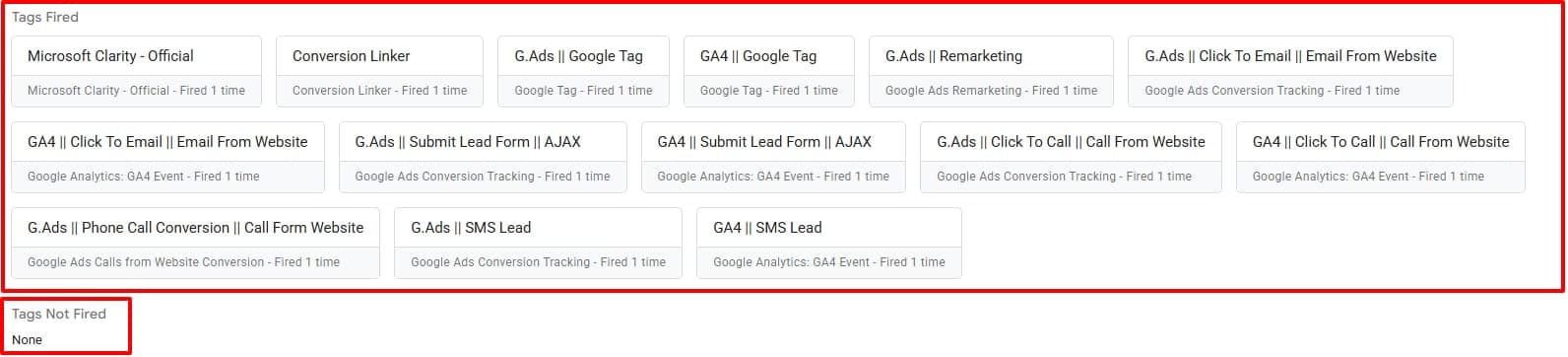
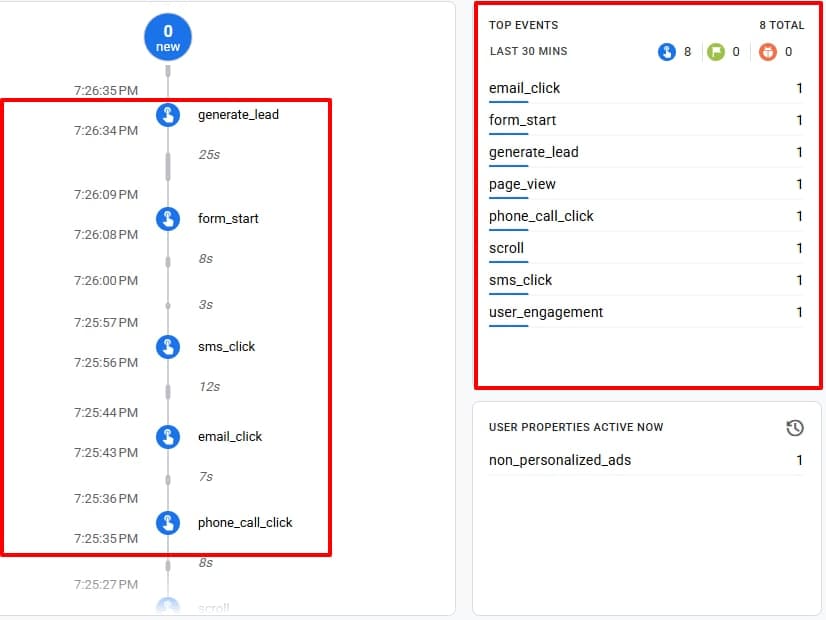
Real Google Tag Manager and GA4 views from a tracking implementation. Each important action fires its own tag and shows up as a named GA4 event, so it can be checked before optimisation.

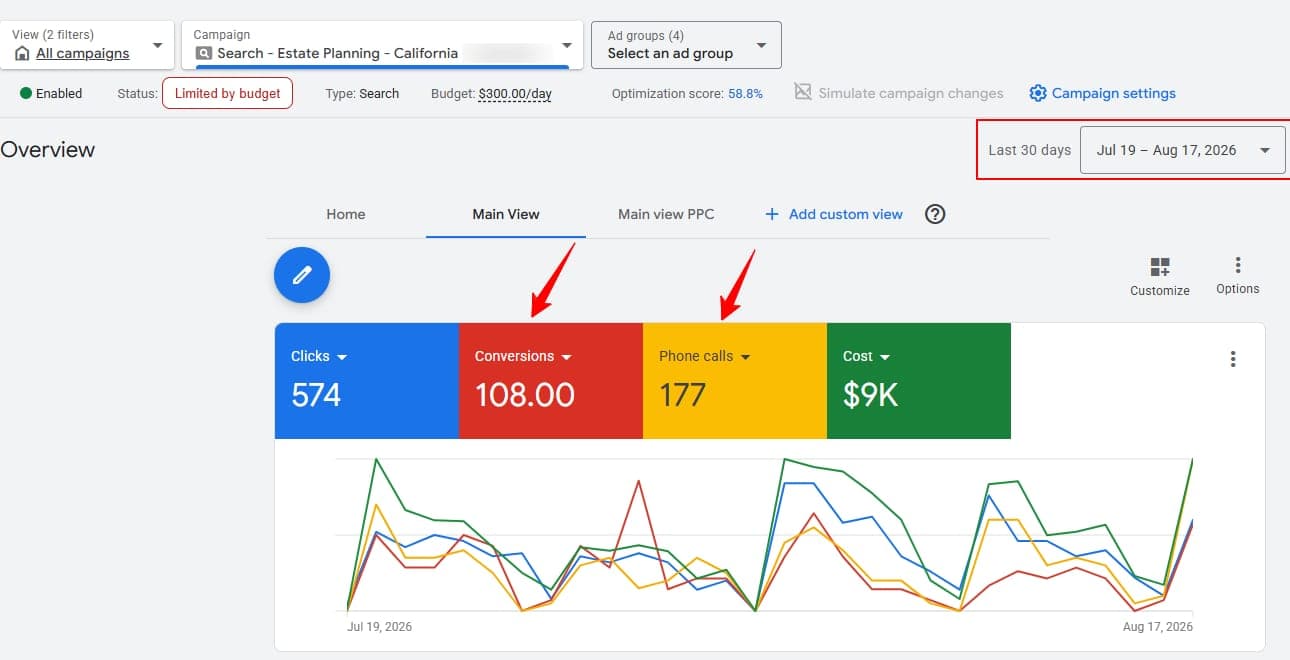
The result inside Google Ads

Real Google Ads account overview for an estate planning campaign: 108 conversions and 177 phone calls tracked over 30 days
Conversions and phone calls tracked in a real account, last 30 days.
Google Tag Manager preview showing tags fired for click to call, phone call conversion, submit lead form, click to email and SMS lead, for both Google Ads conversion tracking and GA4 events, with no tags left unfired
Tags fired in a real GTM preview session. Tags not fired: none.
GA4 DebugView showing phone_call_click, sms_click, email_click, form_start and generate_lead events arriving in sequence
The same actions arriving as named GA4 events.

What the screenshots show

  • Click-to-call and phone call conversion tags firing for Google Ads and GA4
  • Submit lead form tags firing for Google Ads and GA4
  • Click-to-email and SMS lead tags firing for Google Ads and GA4
  • GA4 events for each action: phone_call_click, form_start, generate_lead, sms_click and email_click
  • A Tags Not Fired list showing none
Direct Google Ads vs GA4 import

Two valid ways for a conversion to reach Google Ads.

Direct Google Ads conversion
  1. 01Website / app action
  2. 02Google tag or Enhanced Conversions
  3. 03Conversion action in Google Ads
GA4 event imported
  1. 01GA4 event
  2. 02Linked GA4 + Google Ads property
  3. 03Imported as a Google Ads conversion

Both approaches can be valid, but the definitions and settings behind them need to be intentional. The same outcome should not be counted twice across both paths, and reporting or attribution between the two can differ. We do not claim they will always match exactly.

Business staff member on the phone handling a customer call at their desk
Phone call tracking

A tapped number is not the same as a completed call.

Website tel: click
The visitor tapped a phone number. It does not confirm a call happened.
Call from ads
A call placed through a number shown directly on the ad, tracked by Google.
Call duration conversion, where supported
Some setups can require a minimum call length before it counts.
Qualified / offline call outcome
What happened on the call, fed back from a call-tracking tool or the team, where that data exists.
Form + booking tracking

A successful submission is a stronger signal than a button click.

Tracking is tied to the thank-you page or success message an AJAX form shows, not the click that starts the process, so a form that fails silently is not counted as a lead. A booking works the same way.

Purchase tracking

Purchase is the primary event. Cart and checkout are signals.

No fake revenue figures are shown here. Purchase value is captured with the event where it is available, and duplicate purchases are guarded against.

Enhanced, server-side, offline + lead quality

Stronger signals, and a feedback loop, added only where they solve a real gap.

Browser-side
The standard starting point: a tag fires in the visitor's browser.
Server-side
Added only where it solves a real measurement gap, not by default.
Enhanced conversion signals, where appropriate
Additional first-party matching signals used where the technical setup allows it.
GCLID / click identifiers
Captured where possible so an outcome can be linked back to the click that produced it.
Offline qualified-lead import
Qualified or won outcomes sent back to Google Ads where a CRM or offline workflow supports it.

Ten leads that convert into real business are worth more than a hundred that never should have been called leads. We cannot promise perfect attribution, and none of this bypasses privacy or consent requirements.

How Adlyvo sets it up

A clear process, scoped to what your account needs.

  1. 01

    Audit current conversions

    See what is currently tracked, and what is missing, duplicated or misconfigured.

  2. 02

    Define Primary outcomes

    Agree which actions actually represent business value before touching any tag.

  3. 03

    Review GTM / GA4 / Google Ads

    Check the container, property and conversion-action setup these rely on.

  4. 04

    Build triggers / events

    Configure the tags and events each priority action needs.

  5. 05

    Configure conversion actions

    Set up the actions Google Ads should actually optimise toward.

  6. 06

    Remove / secondary weak actions

    Low-value or unreliable actions are demoted or removed from bidding.

  7. 07

    Validate real success events

    Trigger real forms, calls or purchases and confirm the event lands correctly.

  8. 08

    Check duplicates

    Confirm one outcome is not being counted more than once.

  9. 09

    Add offline / server-side layer, where needed

    Only where it solves a real measurement gap in the setup.

  10. 10

    Document setup

    Leave a clear record of what each conversion action actually measures.

Google Tracking Services

Choose by measurement complexity, not by a random feature list

Essential covers core lead tracking. Enhanced & Server-Side is for more technical attribution needs. CRM & Offline connects lead quality and sales outcomes back to Google Ads.

Foundational

Essential Tracking

From $150 · one-time

Reliable measurement for the core lead actions that matter to Google Ads.

  • Trustworthy measurement for up to 4 priority lead actions that matter to your business
  • Google Ads, GA4 and GTM aligned to one clear conversion measurement plan
  • Forms, calls, WhatsApp clicks or bookings tested from the user action to the final report
  • Core attribution checks completed to reduce missing, duplicated or incorrectly credited leads
  • End-to-end QA evidence and a clear handoff showing exactly what is live
2–3 daysBrowser-side
Revenue attribution

CRM & Offline Attribution

From $500 · one-time

Connect lead quality and downstream sales stages back to Google Ads.

  • Your lead journey mapped from initial enquiry to qualified, booked or won outcomes
  • GCLID, GBRAID and WBRAID captured where possible to preserve ad-click attribution
  • Qualified leads or sales outcomes sent back to Google Ads through a CRM or offline workflow
  • Form-field or data-layer support added so attribution data reaches the correct systems
  • The complete import flow validated, tested and documented for reliable ongoing use
5–10 daysCRM-dependent
  • Starting prices Final scope depends on website platform, event count, third-party booking systems and data-layer quality.
  • Hosting costs Any third-party server-side hosting fee (for example, a tagging host) is separate from implementation fees.
  • Audit first Complex setups are reviewed before implementation so the quote matches the actual technical scope.
  • 01

    Meaningful Primary conversion setup

    Primary conversions are limited to actions that represent real business value, not clicks or page views.

  • 02

    GA4 + GTM + Google Ads validation

    The container, property and conversion actions are checked to work together, not assumed to be correct.

  • 03

    Browser / server-side capability

    A server layer is added where it solves a real problem, not layered on by default.

  • 04

    Qualified-lead / offline visibility

    Conversions can be connected to what happened after them, where that data is available.

Ahasan H. Akash, Founder & Owner of Adlyvo
The person behind your tracking setup

Ahasan H. Akash

Founder & Owner

Ahasan focuses on making sure Google Ads bidding learns from conversions that actually reflect real leads and sales. That means defining what should count as Primary, implementing it correctly across GTM, GA4 and Google Ads, and testing it before it drives budget.

Meet the owner
FAQ

Google Ads tracking questions, answered.

What do you track in Google Ads?

Forms, calls, bookings and other qualified lead actions, using GTM, GA4 and Google Ads conversion actions.

What are Enhanced Conversions?

An option that helps Google Ads match conversions using additional first-party data, where the technical setup allows it.

Can you track calls from my ads and my website?

Yes. Call tracking options depend on your phone setup and are confirmed after the audit.

Why do Google Ads and GA4 show different numbers?

Usually because of different attribution and counting rules, duplicated tags or misconfigured events. A single conversion plan and testing bring them into line.

Which package should I choose?

Essential covers core lead tracking, and the other packages handle more technical attribution and CRM needs. The audit helps decide.

What is the difference between Primary and Secondary conversions?

Primary conversions are the actions that represent real business value, such as a completed form, a meaningful call or a purchase, and they are what bidding optimises toward. Secondary conversions, like a phone-number click or an add to cart, are still measured but kept separate from bidding decisions.

How do you track a form submission properly?

The conversion is tied to a confirmed success state, such as a thank-you page or success message, rather than the click that opens or submits the form. That way, a form that fails silently is not counted as a lead.

How do you prevent duplicate conversions?

Usually by making sure only one path reports a given outcome, for example not sending an event directly to Google Ads and also importing the same event from GA4, and by deduplicating browser and server events where both are used.

What are offline conversions, and do I need them?

Offline conversions let qualified or won outcomes from a CRM or sales process be sent back to Google Ads after the initial lead. They are useful once lead quality varies meaningfully, not required for every account.

Do I need server-side tracking for Google Ads?

Not by default. It is added when it solves a real measurement gap that browser-side tracking cannot. The Server-Side Tracking page covers when it actually makes sense.

Can you recover historical conversion data that was never tracked?

Not retroactively in most cases. If an action was not being measured, that history usually cannot be rebuilt. The focus is on getting the setup trustworthy going forward.

Not sure which Google Ads conversions you can actually trust?

Adlyvo can review your conversion actions, GTM and GA4 setup to identify missing, duplicate or misconfigured conversions before they cost you more budget.

Book an AppointmentBook AppointmentChat on WhatsAppWhatsApp